

Last updated: July 2026
If you’re planning a trip to China, you’ve probably heard that cash is becoming less common. Most shops, restaurants, taxis, and even supermarkets prefer mobile payments through Alipay or WeChat Pay.
Many travelers choose Wise because of its excellent exchange rates and low fees. However, one of the most common questions is: Can I link my Wise card to Alipay?
The short answer is yes — but there are a few important steps and limitations you should know before traveling.
Quick Answer
Yes. You can link both the Wise physical card and the Wise virtual card to Alipay and use them for QR code payments in China — without a Chinese bank account.
| Can Wise be linked to Alipay? | ✅ Yes |
| Chinese bank account required? | ❌ No |
| Foreign passport supported? | ✅ Yes |
| Works with WeChat Pay? | ✅ Yes |
| Personal QR codes (individuals)? | ❌ No |
| Merchant QR codes (shops/restaurants)? | ✅ Yes |
Who Is This Guide For?
This guide is designed specifically for:
- First-time visitors to China who want to pay like a local
- Canton Fair attendees and business travelers needing seamless transactions
- Tourists looking to avoid expensive bank fees
- Digital nomads and students staying in China short-term
- Anyone who wants to avoid carrying large amounts of cash
🧳 Traveling to China Soon? Setting up a Wise account before your trip can make payments easier and help you avoid many of the high foreign transaction fees charged by traditional banks.
Open Your Free Wise Account →Can You Use Wise with Alipay?
Yes. You can link both your physical Wise card and your virtual Wise digital card to Alipay.
Here’s what you need to know:
- ✅ No Chinese bank account required — you can use your Wise card with Alipay as a foreign visitor
- ✅ Virtual and physical cards both work — your digital card has different card details than your physical card, so you can freeze or replace it easily without affecting the other
- ✅ Pay at many shops, restaurants, taxis, supermarkets, and other merchants that accept Alipay payments from international cards
- ⚠️ Some limitations apply — not all transactions are supported (more on this below)
What Doesn’t Work
To set expectations before you rely on this setup, here’s what a Wise card linked to Alipay cannot do:
- ❌ Top up your Alipay balance directly from your Wise card
- ❌ Send or receive Red Packets (Hongbao) — this requires a Chinese bank account
- ❌ Pay personal QR codes (only merchant QR codes work)
- ❌ Some Mini Programs inside Alipay may still require a Chinese-issued card or account to function fully
- ❌ Very small or informal vendors (street stalls, some markets) may not accept foreign cards at all, even through Alipay
| Where You Can Pay | Wise + Alipay |
|---|---|
| Restaurants | ✅ |
| Metro | ✅ |
| Didi (ride-hailing) | ✅ |
| Convenience Stores | ✅ |
| Hotels | ✅ |
| Money Transfer to Friends | ❌ |
| Alipay Wallet Top-up | ❌ |
What You’ll Need Before Linking Wise to Alipay
Before you start, make sure you have everything ready:
- ✅ Wise account — already set up and funded
- ✅ Wise card — either physical or virtual (activate it first if it’s new)
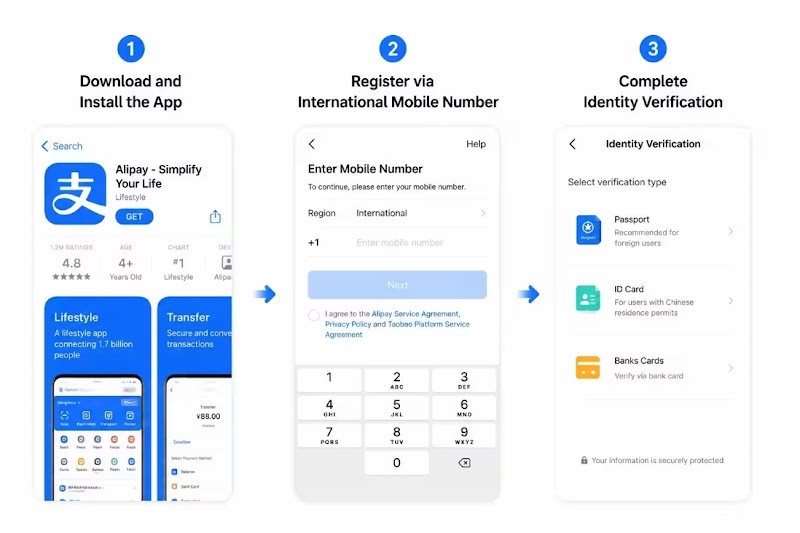
- ✅ Passport — for Alipay’s real-name verification
- ✅ Alipay account — downloaded and registered (you can use your foreign phone number)
- ✅ Internet connection — you’ll need this to complete the setup

Screenshot taken by GuangzhouVisitor.com during the actual Wise–Alipay setup process.
How to Link Wise to Alipay (Step by Step)
⚠️ Important — Before You Start
- You must verify your Alipay account with your passport first.
- Activate your Wise card before linking it (a small purchase or ATM balance check will do).
- Keep a backup payment method — a second card or some cash — in case a step fails.
Follow these steps to add your Wise card to Alipay:
- Open the Alipay app on your phone
- Tap “Me” in the bottom right corner
- Tap “Bank Cards”
- Tap “Add Bank Card” (the + icon)

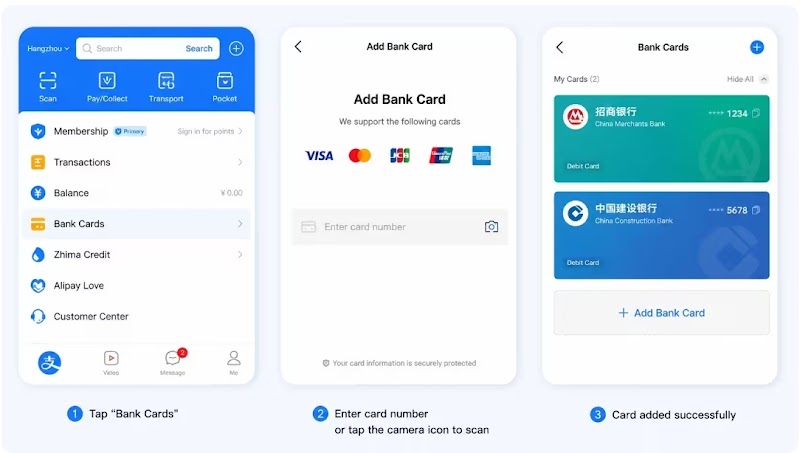

- Enter your Wise card information — card number, expiry date, and CVV
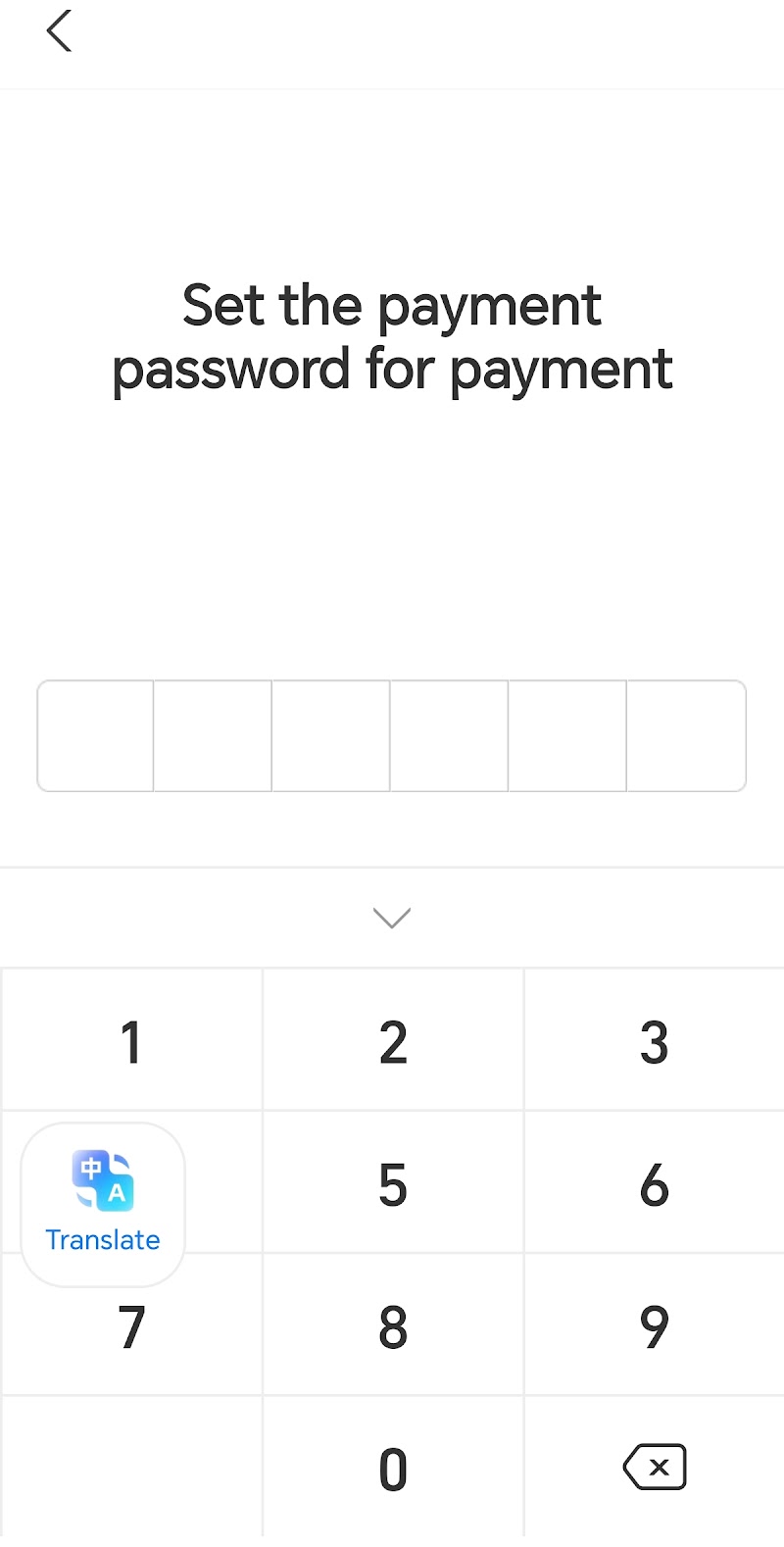
- Set your 6-digit payment password for security
- Enter the verification code sent to your phone number
- Done! You’ll see a “Successfully Added” message once it’s complete

Why Is My Wise Card Not Working?
This is the most important section of this guide. Here are the most common errors travelers face — and how to fix them.
❌ Error 1: “Card can’t be added”
Possible reasons: your Wise card isn’t activated yet, or you haven’t completed Alipay’s real-name verification with your passport.
Solutions: activate your Wise card by making a small purchase or checking your balance at an ATM; complete Alipay’s identity verification using your passport before adding the card; double-check your card number, expiry date, and CVV.
❌ Error 2: Verification failed
Possible reasons: the verification code isn’t arriving (SMS issues).
Solutions: make sure your phone can receive SMS in China (check your roaming settings); try using your Wise digital card instead of the physical card — the digital card has different details.
❌ Error 3: Payment declined
Possible reasons: insufficient balance in your Wise account, or the transaction may exceed the applicable limit for foreign cards.
Solutions: check your Wise balance and top up if needed; be aware that Alipay typically applies an annual spending limit per foreign card (currently around ¥65,000 for most users).
❌ Error 4: Merchant doesn’t accept foreign cards
Possible reasons: you’re trying to pay a personal QR code (not a merchant QR code).
Solutions: foreign cards can only pay merchant QR codes — not personal ones; look for merchants with official business QR codes (most shops, restaurants, and taxis use these).
❌ Error 5: Card works on WeChat but not Alipay
Possible reasons: different verification requirements between the two platforms.
Solutions: use WeChat Pay for transactions where Alipay doesn’t work; both platforms are widely accepted in China, so having both set up gives you flexibility.
❌ Error 6: Alipay says “You can’t use your Wise card for Alipay transactions”
Possible reasons: you’re trying to use a feature that requires a Chinese bank account (like topping up your Alipay balance or sending money to friends).
Solutions: linking your Wise card to Alipay works for merchant payments (scanning QR codes to pay at shops, restaurants, taxis). It does not work for topping up your Alipay balance or peer-to-peer transfers — for these features, you need a Chinese bank account.
Does Wise Work With WeChat Pay?
Yes. You can also link your Wise card to WeChat Pay. The setup process is similar:
- Open WeChat and go to Services → Wallet → Add Bank Card
- Enter your Wise card details and complete verification
Does Alipay Charge Foreign Card Fees?
Yes, but typically only on larger transactions. Based on current Alipay policies:
- Most transactions under certain thresholds are fee-free
- For larger transactions, a platform fee (often around 3%) may apply to the full amount
Can You Keep Chinese Yuan (CNY) in Wise?
Yes. You can hold a CNY balance in your Wise account. This is recommended because, depending on how the payment is processed:
- Funds are often deducted from your CNY balance first when available
- Holding CNY can help you lock in favorable exchange rates before your trip
Does Wise Automatically Convert Currency?
Yes, but with important context depending on the processing route:
- If you have a CNY balance, Wise will use that first — no conversion needed
- If you don’t have enough CNY, Wise will auto-convert from your other currency balances
- However, when paying through Alipay without a CNY balance, Alipay’s own exchange rate may apply in many cases — which could include a markup fee
Common Mistakes Tourists Make
- ❌ Waiting until arriving in China to set everything up — internet access and verification can be tricky upon arrival. Set up Alipay, WeChat Pay, and link your cards before you leave home.
- ❌ Not verifying Alipay with your passport — you can’t link any card without completing real-name verification first.
- ❌ Forgetting to activate the Wise card — a new card won’t work until you’ve made an activation transaction.
- ❌ Not carrying backup cash — technology can fail. Always have some cash for emergencies.
- ❌ Assuming you can pay personal QR codes — foreign cards only work with merchant QR codes.
Wise vs Traditional Bank Cards
| Factor | Wise Card | Traditional Credit Card |
|---|---|---|
| Exchange rate | Mid-market rate (best available) | Bank rate + 1–3% markup |
| Foreign transaction fee | None | Typically 1.5–3% |
| Alipay/WeChat platform fee | Same — applies to all foreign cards | Same — applies to all foreign cards |
| ATM withdrawals | Free up to monthly limit | Cash advance fees + interest |
| Personal QR codes | ❌ Not supported | ❌ Not supported |
| Annual spend limits | Varies by policy | Varies by policy |
Bottom line: Wise wins on exchange rates and zero foreign transaction fees. However, platform fees on Alipay/WeChat (when applicable) apply to all foreign cards — Wise included.
Wise vs Revolut for China (Interactive Comparison)
Both Wise and Revolut are popular multi-currency cards that work well for China travel. Tap a category below to see how they compare.
Wise
- Virtual card: free
- Physical card: one-time fee, roughly $7–$9 depending on your country — no monthly subscription
Revolut
- Virtual card: free
- Physical card: free to issue on the free plan, but delivery typically costs around $7–$10
Which to choose? For most travelers, Wise offers more predictable and transparent costs. Revolut can be a good alternative for specific use cases, depending on your account tier and spending habits.
💜 Prefer Revolut? Join over 75 million users worldwide — sign up and get your card ready for China before you fly.
Sign Up for Revolut →💰 Ready for Your Trip? A Wise account lets you hold multiple currencies, enjoy competitive exchange rates, and easily connect your card to payment apps like Alipay and WeChat Pay (where supported).
Open Your Free Wise Account →Best Payment Setup for China
For a smooth trip, we recommend this combination:
| Payment Method | Best For |
|---|---|
| Wise Card | Best exchange rates, low fees, linked to Alipay/WeChat |
| Alipay | Most widely accepted — shops, restaurants, transport |
| WeChat Pay | Also widely accepted — good backup if Alipay fails |
| Cash | Backup for personal QR codes, small vendors, emergencies |
Frequently Asked Questions
Can I use Wise in China?
Yes. Both the physical and digital Wise cards are accepted anywhere Visa or Mastercard is supported.
Does Wise work with WeChat Pay?
Yes. You can link your Wise card to WeChat Pay the same way you link it to Alipay.
Do I need a Chinese bank account?
No. You can link your Wise card to Alipay and WeChat Pay without a Chinese bank account.
Does Alipay charge fees for using a foreign card?
Alipay may apply a platform fee on certain larger transactions. The exact thresholds and percentages can change, so check the latest fee schedule in the Alipay app.
Can I pay taxis with Alipay using my Wise card?
Yes, as long as the taxi has a merchant QR code (most do).
Can I pay for the metro with Alipay using my Wise card?
Yes, in most major cities that support Alipay for transit payments.
Can I pay restaurants with Alipay using my Wise card?
Yes, restaurants with merchant QR codes accept foreign cards through Alipay.
Can I withdraw cash with my Wise card in China?
Yes. Use ATMs at Bank of China, ICBC, and China Construction Bank — they reliably process Visa and Mastercard.
Is there a spending limit?
Yes. Alipay typically applies an annual limit per foreign card (currently around ¥65,000 for most users, but always verify in the app).
Can I send money to friends via Alipay with my Wise card?
No. Peer-to-peer transfers and topping up your Alipay balance require a Chinese bank account.
Does Wise issue cards to China residents?
No. Wise does not issue cards to mainland China residents. This guide is for international visitors.
Can I pay personal QR codes with my Wise card?
No. Foreign cards — including Wise — cannot pay personal QR codes. Only merchant QR codes are supported.
Do I need a Chinese phone number for Alipay?
No. You can register Alipay with your foreign phone number.
What happens if I don’t have CNY in my Wise account?
Depending on how the payment is processed, Alipay’s exchange rate may apply, which could include a markup fee. Holding a CNY balance helps you avoid this.
Is the Wise card accepted everywhere in China?
Card acceptance is less widespread than in many Western countries. That’s why linking to Alipay and WeChat Pay is essential — it lets you pay at millions of merchants that don’t accept cards directly.
Do I need a physical Wise card, or is the virtual card enough?
The virtual card is enough to link to Alipay and WeChat Pay. Many travelers link both — the virtual card as a backup, since it has different card details and can be frozen independently of the physical one.
Does Wise charge foreign transaction fees in China?
No. Wise doesn’t charge its own foreign transaction fee, and gives you the mid-market exchange rate. The only fee that may apply is Alipay’s own platform fee on larger transactions, which applies equally to all foreign cards.
Can I pay street food vendors with my Wise card through Alipay?
It depends on the vendor. Larger or more established street food stalls often have merchant QR codes and accept foreign cards. Very small or informal vendors may only display a personal QR code, which foreign cards cannot pay — keep some cash handy for these situations.
Is Wise better than Revolut for a China trip?
Both work well and support the same Alipay/WeChat linking. Wise tends to offer more predictable, transparent fees, while Revolut’s costs can vary by account tier — see the comparison table above for the full breakdown.
Before You Fly to China — Checklist
- Create your Wise account
- Order your Wise card (physical or virtual)
- Install Alipay and register with your international phone number
- Install WeChat Pay
- Verify your passport identity
- Add your Wise card to Alipay and WeChat Pay
- Convert some money to CNY in your Wise account
- Carry backup cash for emergencies
Recommended Travel Essentials for China
A few more things worth setting up before you land — alongside your payment cards, a VPN is essential in China since Google, WhatsApp, and most Western apps are blocked without one.
- ✅ Wise Card — Open a free Wise account
- ✅ Revolut (alternative) — Sign up for Revolut
- ✅ eSIM for China — Get connected with Airalo
- ✅ VPN — Stay connected with NordVPN
Final Verdict
For most international travelers visiting China, Wise + Alipay is one of the easiest and most cost-effective payment combinations available in 2026. It won’t cover everything — you’ll still need a Chinese bank account for peer-to-peer transfers or Red Packets, and a little backup cash never hurts — but for day-to-day spending at restaurants, on the metro, in taxis, and at hotels, it’s hard to beat.
Continue Planning Your Guangzhou Trip
Now that your payments are sorted, here’s what else to prepare before you land:
Getting your payment setup right before you land means one less thing to worry about — leaving you free to focus on the markets, the food, and the deals.